
Every managed lock keeps two lists, even when nobody calls them that. One list holds the people who can change the rules. The other holds the people who simply live inside them. The distinction sounds bureaucratic until the first handover, the first departure, or the first time someone needs access restored at an inconvenient hour.
Smart lock admin and user roles are the quiet architecture of shared access. Most buyers study unlock methods and battery types, then discover after installation that the harder questions were about authority: who can add a person, who can remove one, and who owns the list that decides. This article maps that hierarchy for families and for projects.
The two lists inside one lock
On a managed smart lock, a user is a credential: a fingerprint, a code, a card, an account. An administrator is a credential plus the keys to the control room — adding people, removing them, adjusting how the lock behaves, and in some platforms reviewing activity. The two roles are not a ranking of importance. A household’s daily life belongs to users; the dinner-table conversation belongs to the door, not the app. What smart lock admin user roles describe is authority, not status.
The practical consequence shows up the first time something changes. When a cleaner leaves, a user credential is removed and the house carries on. When an administrator leaves, the arrangement itself is up for grabs, because the person who could revoke access is now outside the system.
What administrators can do that users cannot
The exact split depends on the platform, but the pattern is stable across managed locks. Administrators enroll and delete credentials, decide who else counts as an administrator, adjust settings such as locking behavior and prompt volume, and bind or unbind the app accounts that manage the lock. Users open the door with their own credential and nothing else. They cannot add a visitor, cannot extend their own access, and cannot see anyone else’s list.
That asymmetry is the feature. It means one person can run the access list without touching the rest of the household’s daily methods, and it means a compromised or careless user credential cannot quietly add a second one.
A concrete ratio from our own range
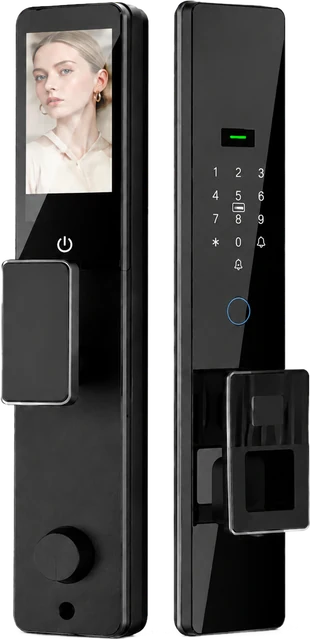
Abstract roles become clearer with numbers, so here is one from our own documentation. The DDL1 fully automatic smart lock records capacity for 3 administrators and 297 normal users. Read that ratio the way a system designer would. User slots are abundant — effectively a whole building’s worth of residents, staff and visitors. Administrator slots are the scarce, deliberate resource.
For a single household, three administrators is more than enough, and the sensible move is to use fewer than the maximum. For a project, the same ratio raises the handover question in a useful form: not “how many users can this lock hold?” but “who are the three people who will govern the list, and how does that authority transfer when the building changes hands?”
Why handover is where roles earn their keep
A building’s access system changes hands more often than its locks do. The developer finishes and steps back; the property manager takes over; the manager contracts a cleaning company; the cleaning company rotates staff. Each of those transitions is a moment when somebody must still be able to add or remove a credential — and a moment when an unmanaged admin list becomes a liability, because an old administrator is an access path that no current employee controls.
Handling this well does not require exotic features. It requires deciding, in writing, who holds administrator access at each stage, and making the transfer part of the handover agenda rather than an afterthought. The wider patterns for this are covered in our guide to different access management models and in the property-type overview at matching entry hardware to property type.
Families: keeping the admin circle small
In a home, the temptation is to make everyone an administrator “so nobody is blocked.” It is worth resisting. An administrator can change the rules for everyone, so an admin who misunderstands the system creates problems for the whole household, and the more admins there are, the harder it is to know who changed what. Two administrators — typically the adults who already manage the household’s practical affairs — covers the realistic cases. Teenagers and older relatives are excellent users, and remain fully able to use the door.
One rule covers most departures: the admin list should never shrink to one person. Two administrators means a lost phone, a hospital stay, or a move to a new job never leaves the household locked out of its own access list.
Role hygiene in five minutes
A short routine that keeps the hierarchy honest
- Keep the admin list written down — names, not just accounts — where the household or the site keeps its practical documents.
- When anyone leaves the household or the project, remove their user credential and check whether they held admin rights anywhere else.
- Before a departing administrator goes, transfer admin access and confirm that the new holder can add and remove a test credential.
- After any change to the list, test one ordinary user path — unlock, enter, lock — before the day it matters.
- Decide who holds the platform account that the lock is bound to; that account is a third layer above admin rights, and it should not be a mystery.
What to ask before multi-unit deployment
For distributors and integrators specifying locks across many doors, smart lock admin user roles become a due-diligence item. Three questions expose most of what matters. How many administrators can the lock hold, and can administrator authority be moved from one person to another? How many user credentials can be managed, and does the platform support temporary access for the people who pass through rather than live there? And how does the system behave when the first administrator leaves the project — is the path documented, or does it depend on institutional memory?
The user-side answers are just as important. Serviced apartments and rentals, for example, need temporary credentials to be routine rather than a workaround; our DDZ17 room-door model documents temporary password support and a 300-user capacity for exactly this class of property, where the access list rotates constantly and the admin list should not.
Three questions about roles
How many administrators should a lock have?
Smart lock admin user roles are a governance tool, so fewer is usually stronger: enough to avoid a single point of failure, few enough that the list stays accountable. For a household, two is the useful number. For a property, one per responsible function — with the transfer rules written down before they are needed.
Can two people share one user credential?
They can, and it quietly breaks the system. A shared code or card cannot be revoked for one person without disturbing the other, and its activity cannot be attributed. The whole value of per-person credentials is that removal is clean, so shared credentials undermine the only part of the arrangement that matters.
What happens to user access when an administrator changes?
Nothing — and that is the design goal. User credentials keep working while administrator rights move. What must never happen is the reverse: user access silently expanding because the admin layer was left unmanaged. If the handover is done properly, everyday life never notices it happened.
Equipping a project with managed access?
CaremLock supplies smart lock ranges with documented administrator and user capacities for distributors, installers and project buyers. Tell us the property type and who will hold authority at each stage — we will map the roles from our documentation.
Or explore the DDL1 fully automatic model and contact the team.